
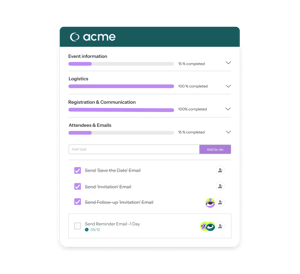

Task manager: organize your event projects
Assign tasks to your teams, set deadlines, track progress directly within Eventdrive, in the context of each event. No additional tool to synchronize.
When a team manages five to ten events in parallel, cross-functional visibility becomes critical. The Eventdrive task manager aggregates all tasks across ongoing events into a consolidated view, filterable by event, assignee, or deadline. A tool for both management and execution.
A tool integrated into your organization
The difference compared to a generic task management tool: tasks are created within the context of a specific event, assigned to members of the team already configured in Eventdrive, and visible to all relevant collaborators without additional access rights to manage.
Each event manager sees only their own tasks across the events they are responsible for - not those of other teams.

What you can do
Create task lists for each event
Tasks are organized by category, with a deadline and an owner assigned to each task. Multiple event managers can work simultaneously on the same event without stepping on each other’s toes.
Reuse your lists from one event to another
Combined with event templates, your standard task list is automatically replicated for each new event of the same type. Recurring tasks no longer need to be recreated manually.
Greater clarity
Work on multiple events in parallel, receive alerts in case of delays, and keep control over the progress of your projects.
Progress visibility
The progress of each task is visible from the dashboard. Automatic reminders before deadlines prevent oversights without requiring manual follow-ups.
Share resources across teams
The shared media gallery centralizes documents and visuals useful for preparation, accessible to all assigned team members.
A tool to manage your events
- Access to a shared media gallery
- Assign a deadline to each created task
- Send automatic reminders before deadlines
- Create multi-event task lists
- Assign task(s) to team members
They organize their events with Eventdrive



.png?width=300&name=MGP%20(1).png)
.png?width=300&name=Helvetia%20(2).png)

.png?width=300&name=SIACI%20(1).png)
.png?width=300&name=Alten%20(1).png)

.png?width=300&name=La%20banque%20postale%20(1).png)

.png?width=300&name=Minist%C3%A8re%20de%20la%20transition%20%C3%A9cologique%20(2).png)


Want to know more?
We show you, you decideOrganize Your Teams and Manage Your Processes